> ## Documentation Index
> Fetch the complete documentation index at: https://docs.social-api.ai/llms.txt
> Use this file to discover all available pages before exploring further.
# ChatGPT
> Connect SocialAPI.AI to ChatGPT on web, desktop, and mobile.
**MCP Server URL:** `https://api.social-api.ai/mcp`
## Web & Desktop
### Prerequisites
* A [SocialAPI.AI](https://social-api.ai) account with at least one connected social account
* Any ChatGPT plan (Apps are supported on all plans, including Free, Plus, Pro, Business, Enterprise, and Education)
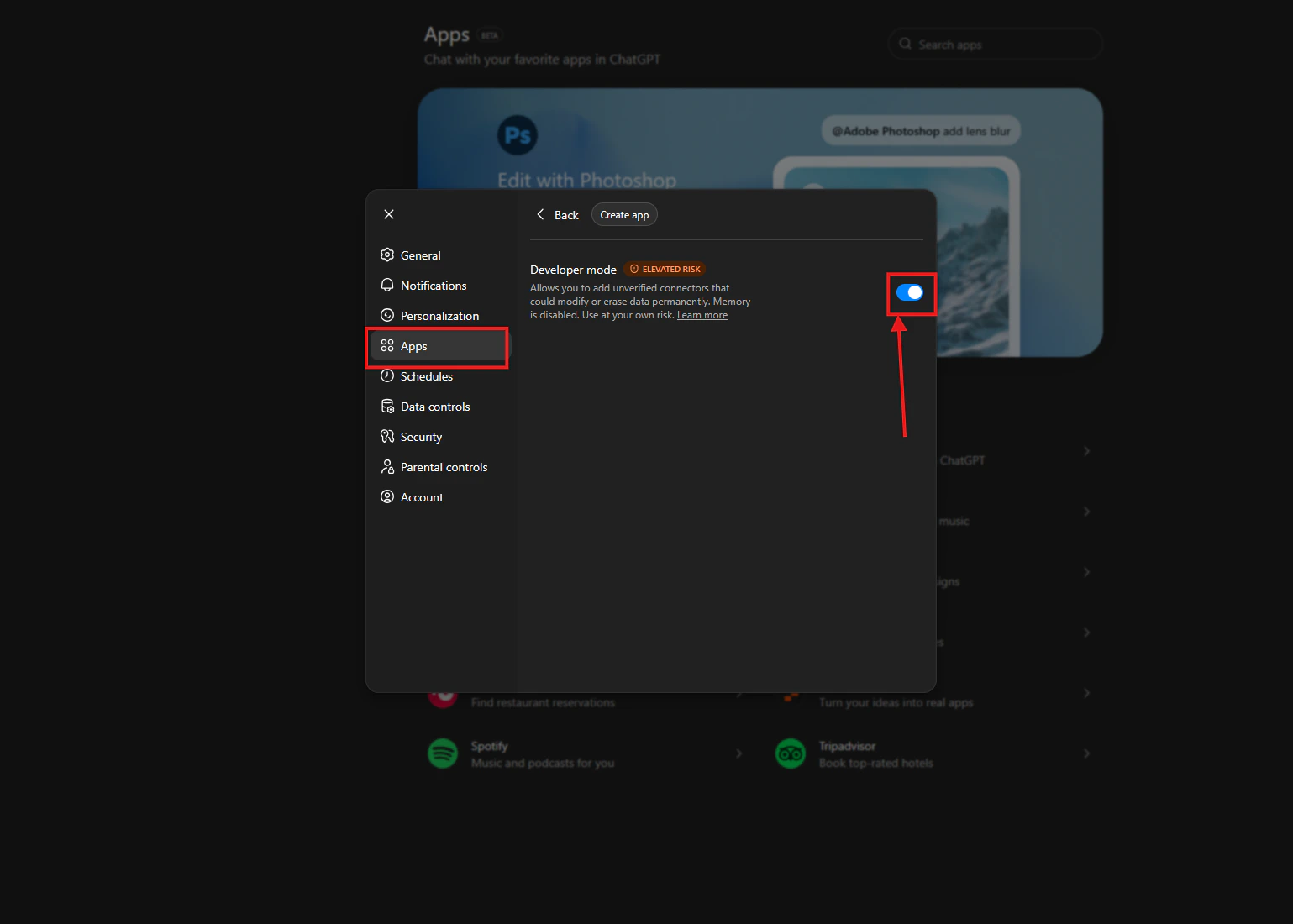
### 1. Enable Developer Mode
Go to **Settings → Apps & Connectors → Advanced settings** and toggle **Developer Mode** on.
 ### 2. Create a connector
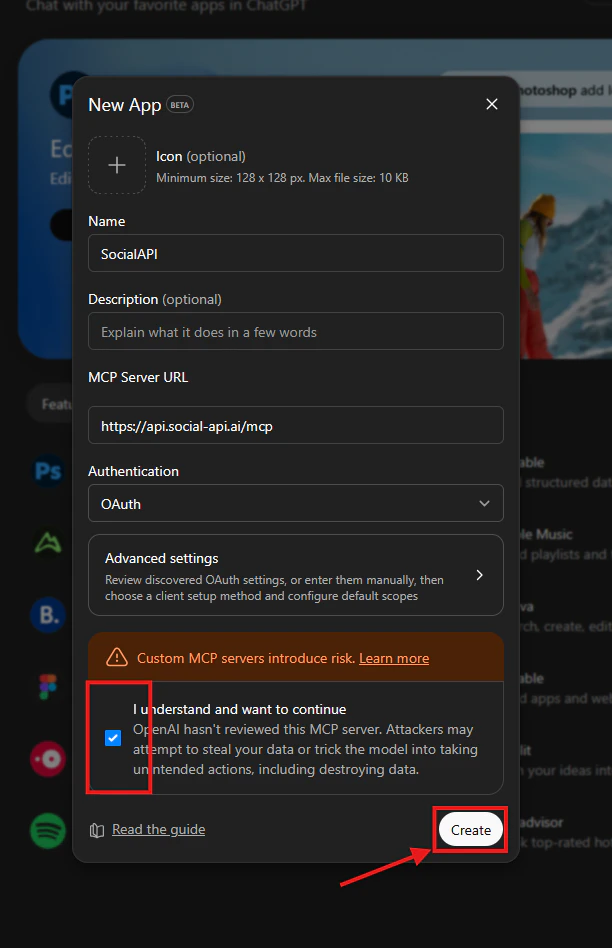
Go to **Settings → Connectors → Create** and fill in:
* **Name:** `SocialAPI.AI`
* **Description:** `Manage social media accounts, posts, comments, DMs, reviews, and mentions`
* **Connector URL:** `https://api.social-api.ai/mcp`
ChatGPT will test the connection and display the available tools if successful.
### 2. Create a connector
Go to **Settings → Connectors → Create** and fill in:
* **Name:** `SocialAPI.AI`
* **Description:** `Manage social media accounts, posts, comments, DMs, reviews, and mentions`
* **Connector URL:** `https://api.social-api.ai/mcp`
ChatGPT will test the connection and display the available tools if successful.
 ### 3. Authorize with your account
When you first use a [SocialAPI.AI](https://social-api.ai) tool, ChatGPT initiates an OAuth 2.1 flow with PKCE. A browser window opens to the [SocialAPI.AI](https://social-api.ai) authorization page. Log in and click **Authorize**.
### 3. Authorize with your account
When you first use a [SocialAPI.AI](https://social-api.ai) tool, ChatGPT initiates an OAuth 2.1 flow with PKCE. A browser window opens to the [SocialAPI.AI](https://social-api.ai) authorization page. Log in and click **Authorize**.
 ChatGPT supports OAuth 2.1 with PKCE and Dynamic Client Registration. It auto-discovers your authorization server via `/.well-known/oauth-protected-resource` - no manual auth configuration is needed.
### 4. Enable in a conversation
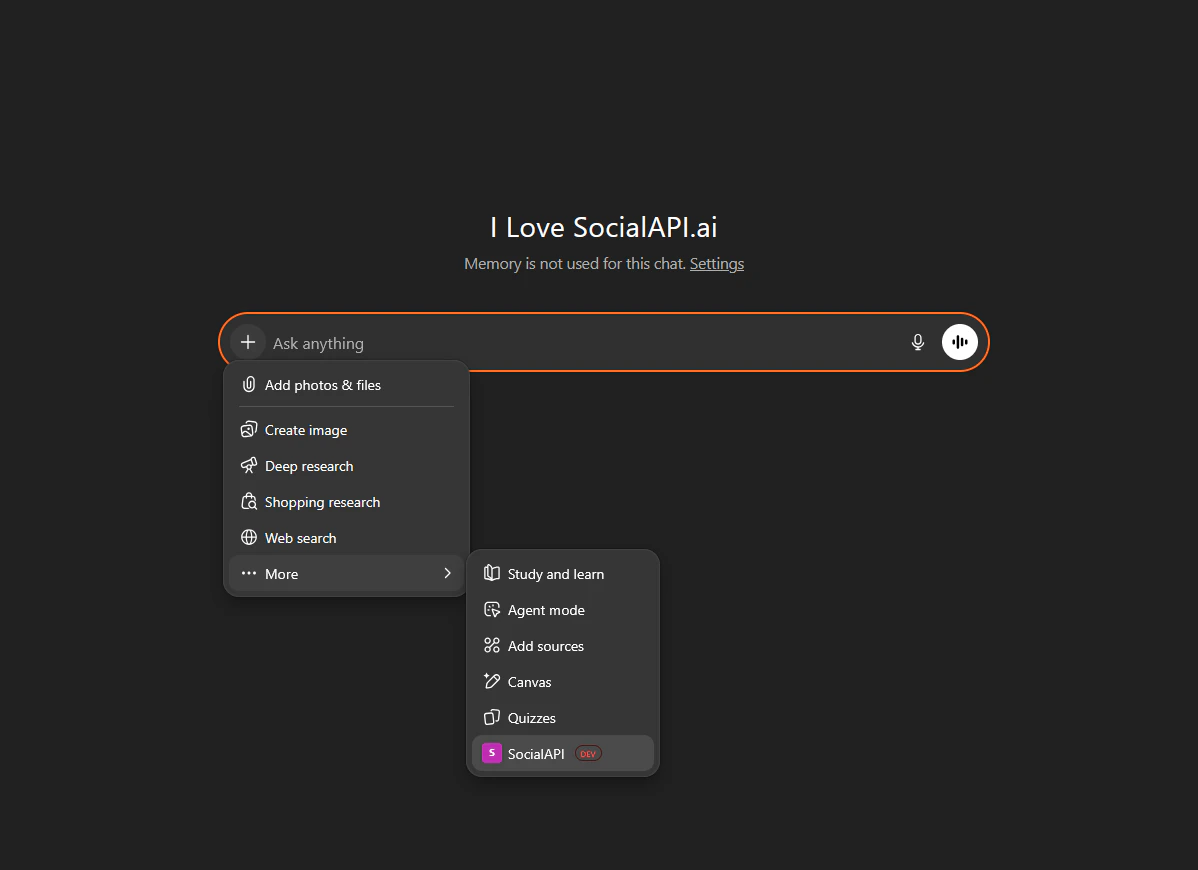
Open a new conversation, click the **+** button near the message composer, select **More**, and toggle your [SocialAPI.AI](https://social-api.ai) connector on.
As of December 2025, OpenAI renamed "connectors" to "apps" in parts of the UI. The functionality is the same.
***
## Mobile (iOS / Android)
Connectors created on ChatGPT web are available on the ChatGPT mobile apps (iOS and Android). You cannot create new connectors from the mobile app - set them up on the web first.
1. Add [SocialAPI.AI](https://social-api.ai) as a connector on [chatgpt.com](https://chatgpt.com) (see [Web & Desktop](#web--desktop) above)
2. Open the ChatGPT mobile app - the connector is already available
3. Enable it in a conversation via the **+** menu
ChatGPT supports OAuth 2.1 with PKCE and Dynamic Client Registration. It auto-discovers your authorization server via `/.well-known/oauth-protected-resource` - no manual auth configuration is needed.
### 4. Enable in a conversation
Open a new conversation, click the **+** button near the message composer, select **More**, and toggle your [SocialAPI.AI](https://social-api.ai) connector on.
As of December 2025, OpenAI renamed "connectors" to "apps" in parts of the UI. The functionality is the same.
***
## Mobile (iOS / Android)
Connectors created on ChatGPT web are available on the ChatGPT mobile apps (iOS and Android). You cannot create new connectors from the mobile app - set them up on the web first.
1. Add [SocialAPI.AI](https://social-api.ai) as a connector on [chatgpt.com](https://chatgpt.com) (see [Web & Desktop](#web--desktop) above)
2. Open the ChatGPT mobile app - the connector is already available
3. Enable it in a conversation via the **+** menu